How it works

From checkout to live in days, not months.

Here's exactly what happens, who does what, and where you stay in control. Your project moves through the six stages below, tracked in your dashboard from intake to live. Change rounds happen inside the Review stage.

6 stages
From checkout to live
You approve
Nothing goes live without sign-off
3-5 days
Typical Launch build
The pipeline

Six real stages, and what each one means for you.

Every project moves through the same stages: intake, building, review, changes, approved, live. For each one, here's what we do, what you do, and what you'll see in your dashboard.

1. Intake

What we doSend you a short, plain language intake form right after checkout and answer any questions as you fill it.
What you doTell us your services, service areas, hours, and the details only you know, and upload up to 50 photos (or let us use trade-matched stock photos if you don't have many).
In your dashboardYour project shows the Intake stage. Your build clock starts only after your intake is complete.

2. Building

What we doAssemble your site from proven home service layouts, then tune the words, the way Google reads each page (on-page SEO), and the contact flow for your trade and brand.
What you doNothing here, this part is on us. We'll reach out only if we need a missing detail.
In your dashboardThe stage reads Building so you always know your site is in progress.

3. Review

What we doHand you a private preview link to the finished site inside your dashboard.
What you doRead every page on your phone and on desktop, then decide what, if anything, to change.
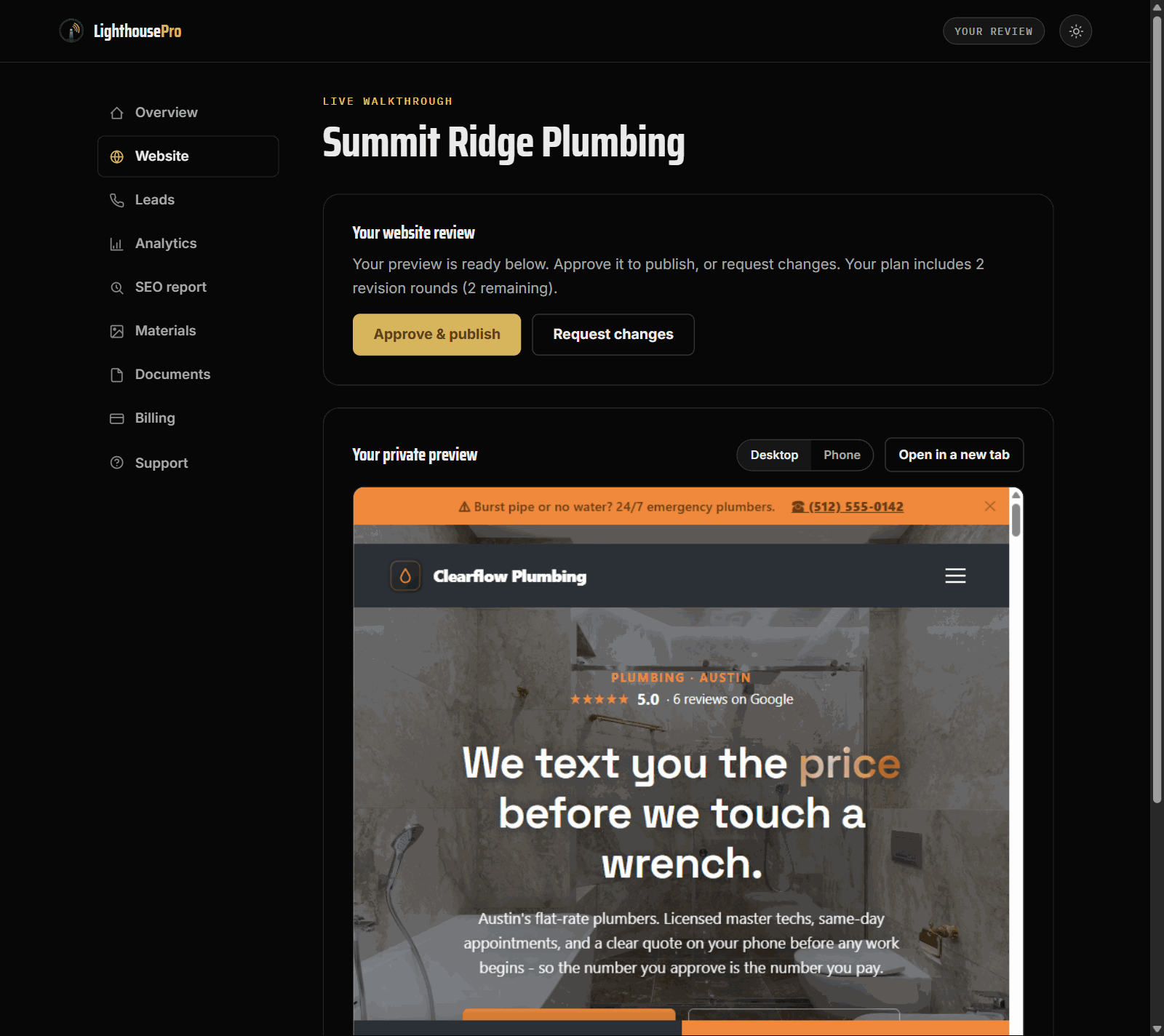
In your dashboardThe stage reads Your review, and your site appears right inside the dashboard, next to the approve and request-changes buttons.
The review stage in your dashboard: your finished site in a private preview, with Approve & publish and Request changes buttons
The real review screen: your private preview with the approve and request-changes buttons right beside it.

4. Changes

What we doMake the edits you asked for and put the updated site back in front of you. Launch includes one revision round; Growth includes two.
What you doWrite your change requests in your own words. No tech terms required, just describe it plainly.
In your dashboardThe stage stays on Your review while we make your changes, and the status panel tells you exactly what we're working on.

5. Approved

What we doLock in the version you signed off on and queue it for launch, exactly as you approved it.
What you doHit Approve when the site looks right. That sign-off is the only thing that triggers launch.
In your dashboardThe stage reads Approved, confirming the site is cleared to go live.

6. Live

What we doConnect your domain, turn on the security padlock browsers look for (HTTPS), test the quote forms and tap-to-call, then host and maintain the site.
What you doGet back to work. Reply to the leads that come in, and send us edits whenever your business changes.
In your dashboardThe stage reads Live, with your real address linked so you can visit the published site anytime.
Your dashboard

One sign-in, one place to watch it all happen.

No passwords to remember and no separate accounts. You enter your email, we send a one-time link, and you land on your dashboard.

  • Enter your email on the customer login page.
  • We email you a one-time sign-in link, click it and you're in.
  • You land on a single dashboard for your project, no account setup.
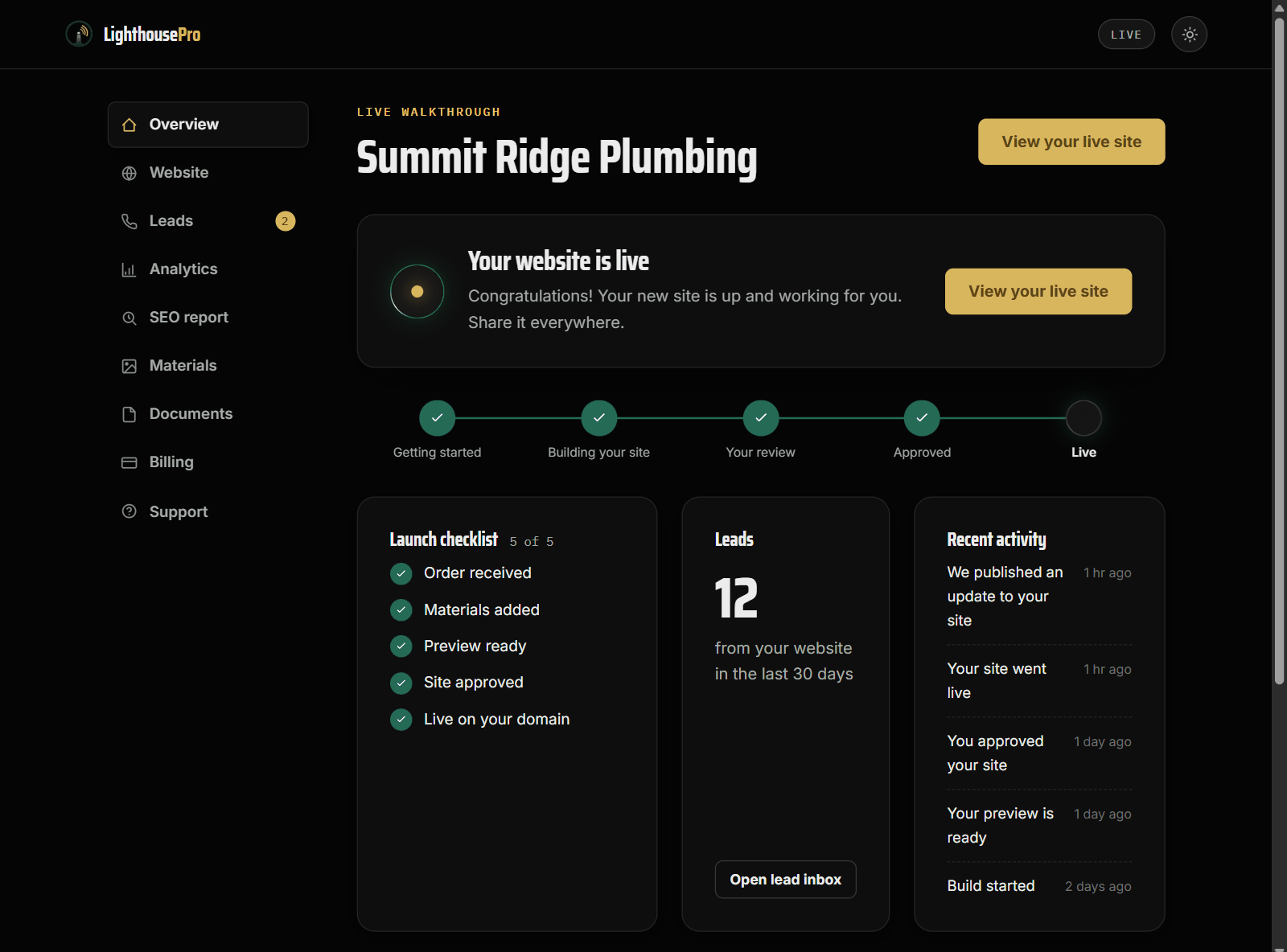
The dashboard overview: your stage tracker from Getting started to Live, the launch checklist, and your lead count
Your dashboard overview: the stage tracker, launch checklist, and lead count, updated as your project moves.

Magic-link sign-in

Type your email, get a one-time link by email, and open your dashboard. There's nothing else to install or set up.

Preview, approve, or request changes

From the Review stage you preview the full site, then either approve it or send your change requests, all from the same screen.

Revisions, stated plainly

Launch includes one revision round. Growth includes two. Each round is a full pass on your change requests before you approve.

Timelines

How long it takes, counted from your completed intake.

Every timeline below starts the day your intake is complete, not the day you pay. Finishing the intake quickly is the fastest way to a live site.

Starter Website

2-4business days

One sharp page with up to 5 sections, built and ready for your review, after your completed intake.

Launch Website

3-5business days

A 1-5 page site, built and ready for your review, after your completed intake.

Growth Engine

4-7business days

A larger 6-10 page site with service and city pages, after your completed intake.

Rush delivery

1-2business days

An optional $99 add-on that moves your build to the front of the line, after your completed intake.

Ready when you are

Pick a package and start the pipeline.

Choose your package, complete your intake, and watch the stages move toward live. You approve before anything goes public.

Or email [email protected]